Preface
- Bluetooth communication programming is very close to the physical layer, the closer to the physical world, the further away from those perfect abstract programming concepts. Handling these Bluetooth instructions is indeed very tedious, and the so-called SesameSDK is exactly a good implementation of these complex operations, and it is encapsulated into an open source library for easy use.
- This whole set of Bluetooth protocols is the crystallization of hard work and wisdom of the third-generation engineers of CANDY HOUSE for more than ten years (2014〜2016, 2017〜2019, 2020〜), its open source does not mean "cheap and no good goods", on the contrary, we hope This work that we think is near perfect can be used as a set of "living" Bluetooth protocols to carry forward the central ideas in the world.
- Bluetooth operation involves two main parts: Bluetooth Broadcasting and Bluetooth Data Transfer, which will be introduced in detail.
Bluetooth Broadcasting (BLE Advertising)
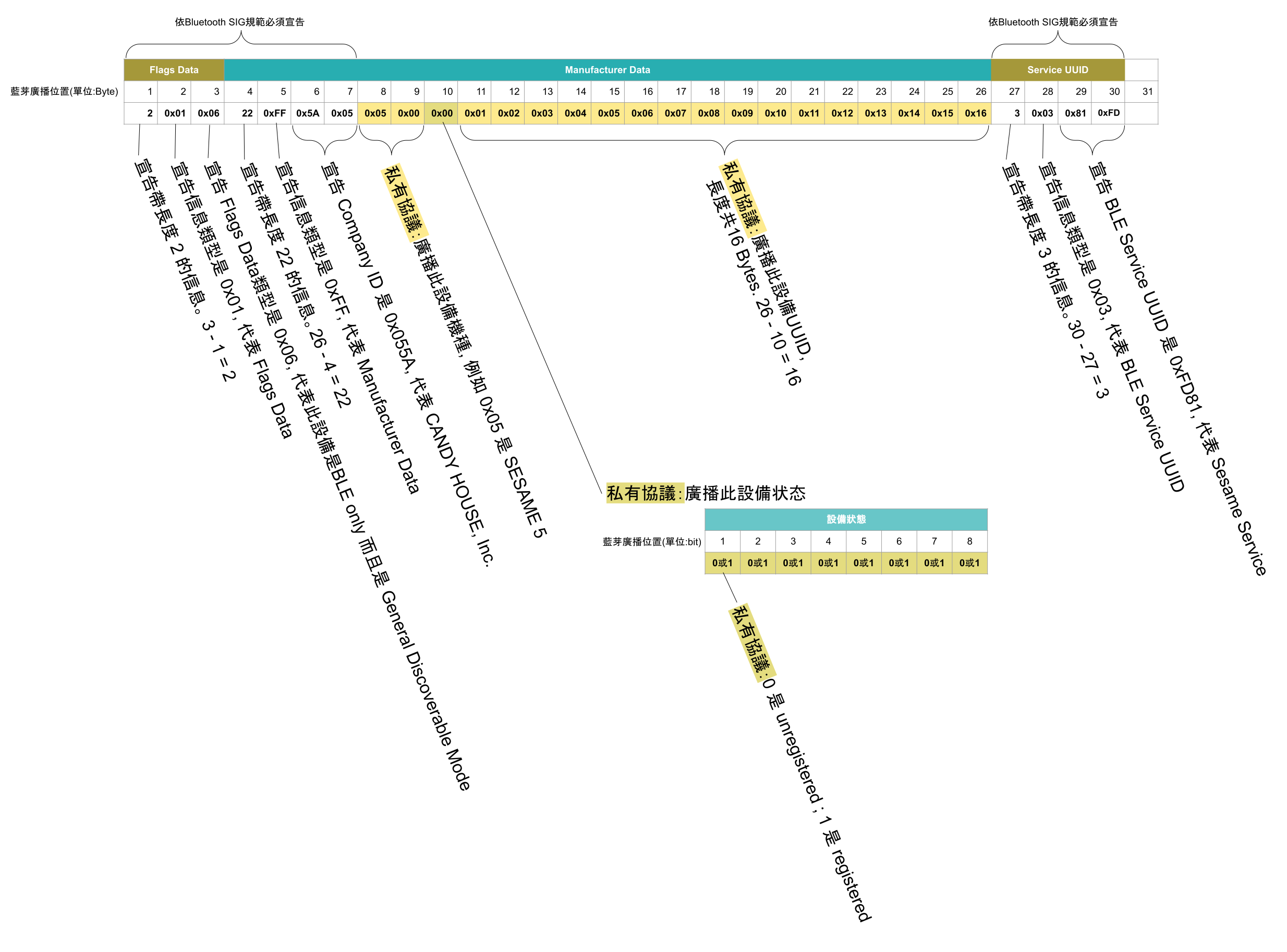
- The longest length of Bluetooth LE 4.0 advertising is 31 bytes.
- Yellow background or yellow background indicates the protocol defined by CANDY HOUSE.
- The rest of the white background is a mandatory declaration required by the Bluetooth SIG specification.
Official IDs of Bluetooth SIG
- https://www.bluetooth.com/specifications/assigned-numbers/
- Official Identifiers registered by CANDY HOUSE in Bluetooth SIG:
| Decimal | Hex | |
|---|---|---|
| BLE Service UUID | 64897 | 0xFD81 |
| Company ID | 1370 | 0x055A |
Product Model
- The 8th and 9th bytes in the Bluetooth broadcast express the model
| 8th 9th Bytes | Model |
|---|---|
| 0 | Sesame 3 |
| 1 | WiFi Module 2 |
| 2 | Sesame Bot 1 |
| 3 | Sesame Bike 1 |
| 4 | Sesame 4 |
| 5 | Sesame 5 |
| 6 | Sesame Bike 2 |
| 7 | Sesame 5 Pro |
| 8 | Open Sensor |
| 9 | Sesame Touch 1 Pro |
| 10 | Sesame Touch 1 |
| 11 | Ble Connector |
| 13 | Hub 3 |
| 14 | Sesame Remote |
| 15 | Remote Nano |
| 16 | Sesame 5 US |
| 17 | Sesame Bot 2 |
| 18 | F2 |
| 19 | F1 |
| 20 | Bluetooth Optical Relay |
Device Status
- The 10th byte in the Bluetooth broadcast is split into 8 bits, each bit expressing various device status
| 8 bits of the 10th byte | Device Status | |
| 0 | 1 | |
| 1st bit | Unregistered | Registered |
| 2nd bit | ||
| 3rd bit | ||
| 4th bit | ||
| 5th bit | ||
| 6th bit | ||
| 7th bit | ||
| 8th bit | ||
Compliance with Accessory Design Guidelines for Apple Devices
- 49.2 Advertising Channels The accessory should advertise on
all three advertising channels (37, 38, and 39)at each advertising event. See the Bluetooth 4.0 specification, Volume 6, Part B, Section 4.4.2.1. - https://developer.apple.com/accessories/Accessory-Design-Guidelines.pdf Release R21
Encourage to use nRF Connect app to get familiar with Sesame BLE adv
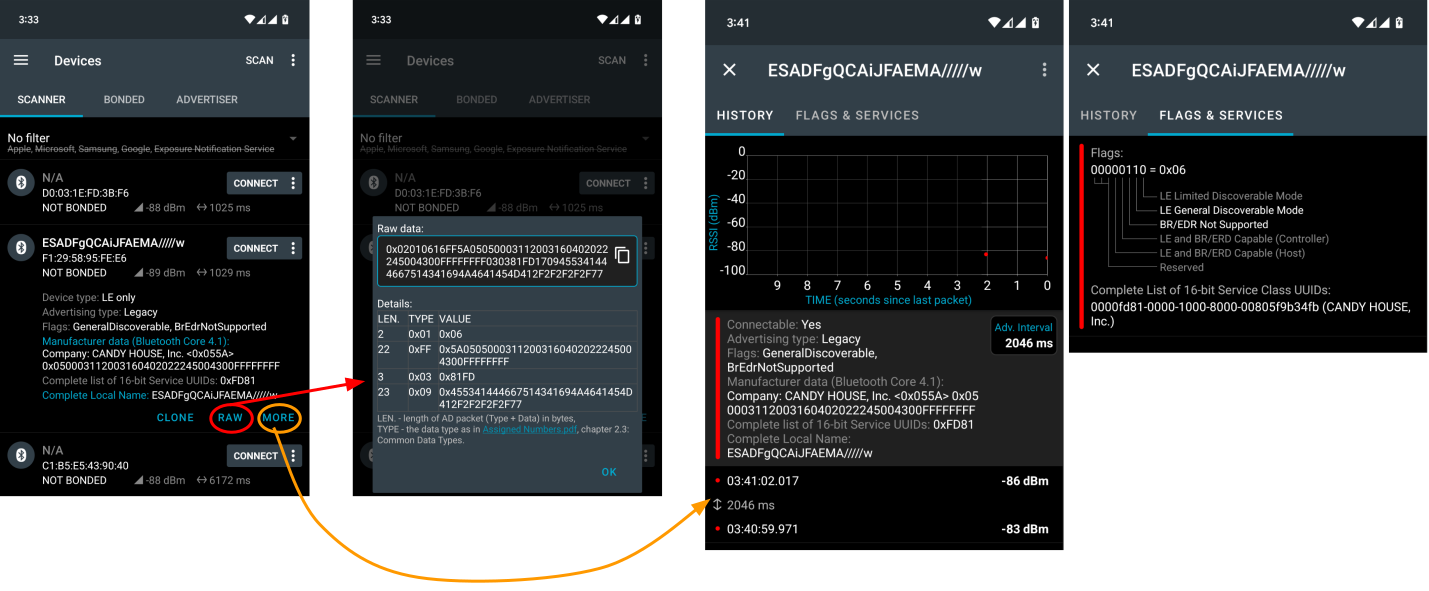
- We recommend you to use the nRF Connect App to verify and familiarize yourself with Sesame BLE adv
- https://play.google.com/store/apps/details?id=no.nordicsemi.android.mcp
- https://apps.apple.com/app/id1054362403
Bluetooth Data Transmission (BLE Data Transmission)
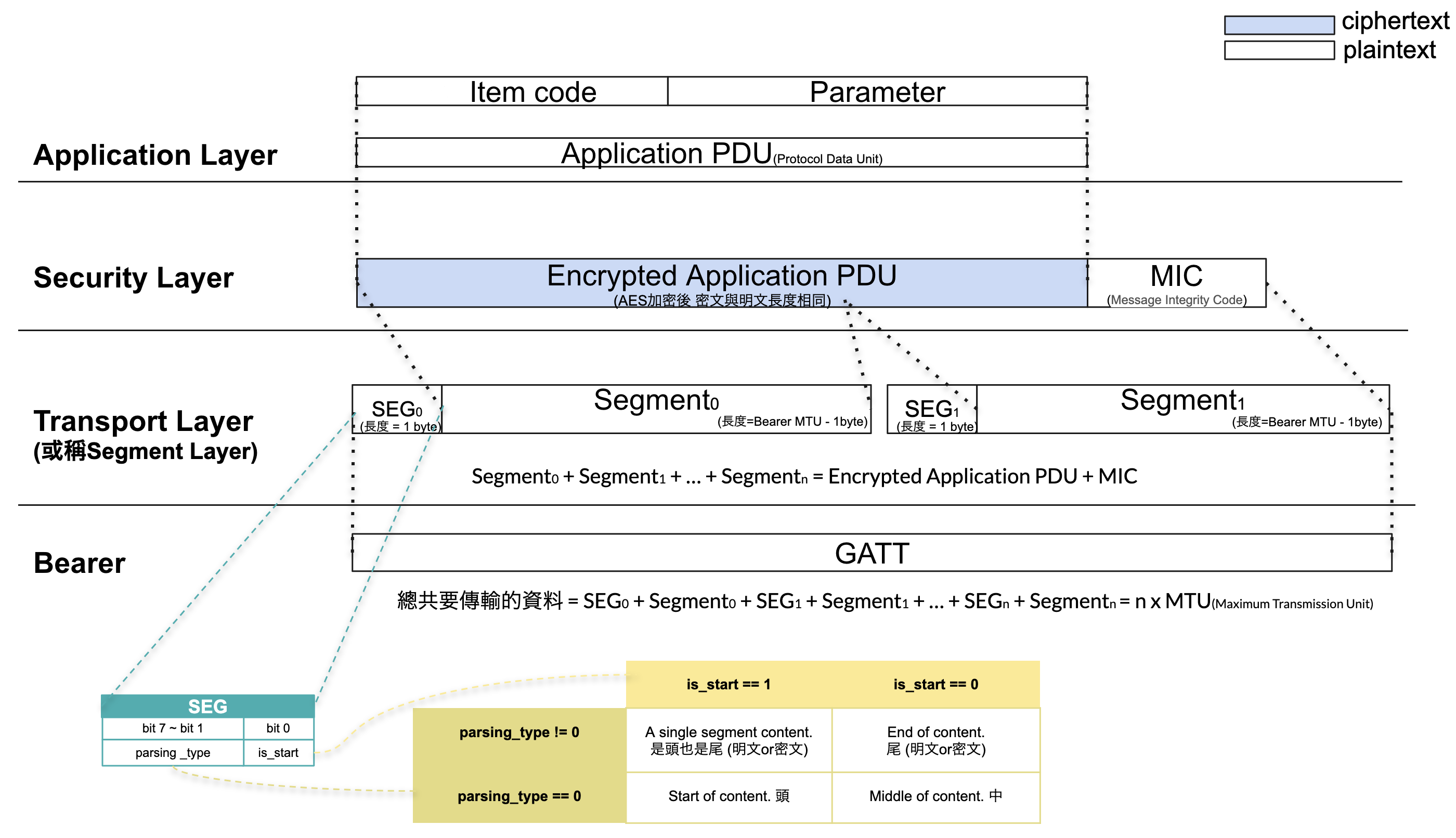
- Inspired by the TCP/IP Model, we divide Bluetooth communication into 4 layers.
The plain text of any format informationisencryptedandcutand thentransmitted through Bluetooth GATT. The 4 states are called Application Layer , Security Layer , Transport Layer , GATT Bearer Layer .- This way of cutting information can transmit arbitrarily formatted information of infinite length.
Transmission Protocol Request, Response and Publish
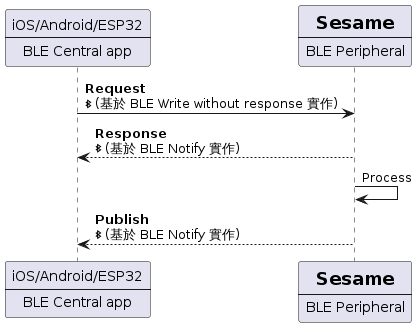
- Inspired by RESTful API to add, delete, inquire, and change the database POST method, we encapsulated 1 command method based on
BLE write without response:
・Request - Inspired by RESTful API async/sync, we packaged 2 receiving callback methods based on
BLE notify:
・Response
・Publish - The
Responsemethod has no relationship to BLE write withoutresponseof the same name, and this causes confusion we are very sorry. - Every
Requestwill receive aResponseimmediately. The information needs execution time to know the execution result withPublishfeedback.
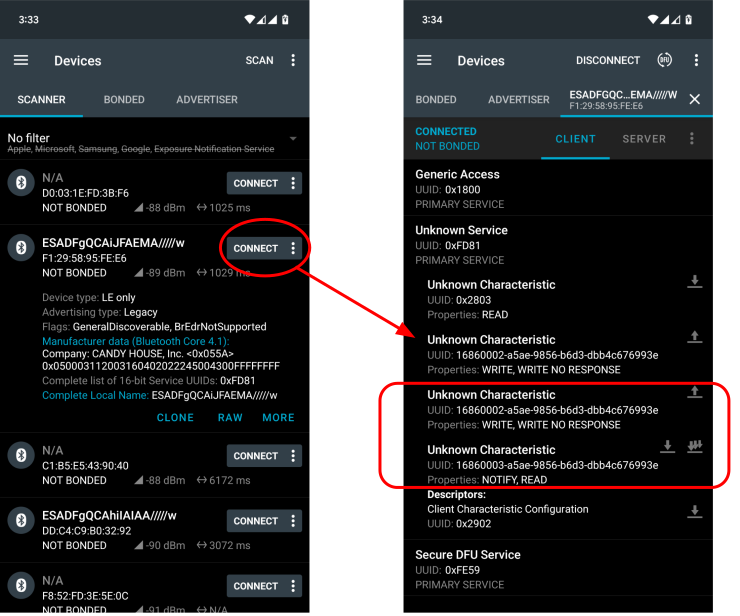
Only use 2 BLE Characteristics to receive and transmit Bluetooth information
- When receiving and transmitting Bluetooth information through Request, Response, Publish method, only 2 BLE Characteristics of the Sesame BLE Service (0xFD81) will be used.
- The Characteristics of UUID 16860002-a5ae-9856-b6d3-dbb4c676993e is used to write BLE commands without response.
- The Characteristics of UUID 16860003-a5ae-9856-b6d3-dbb4c676993e is used to receive BLE Notify
Application Layer Business Content
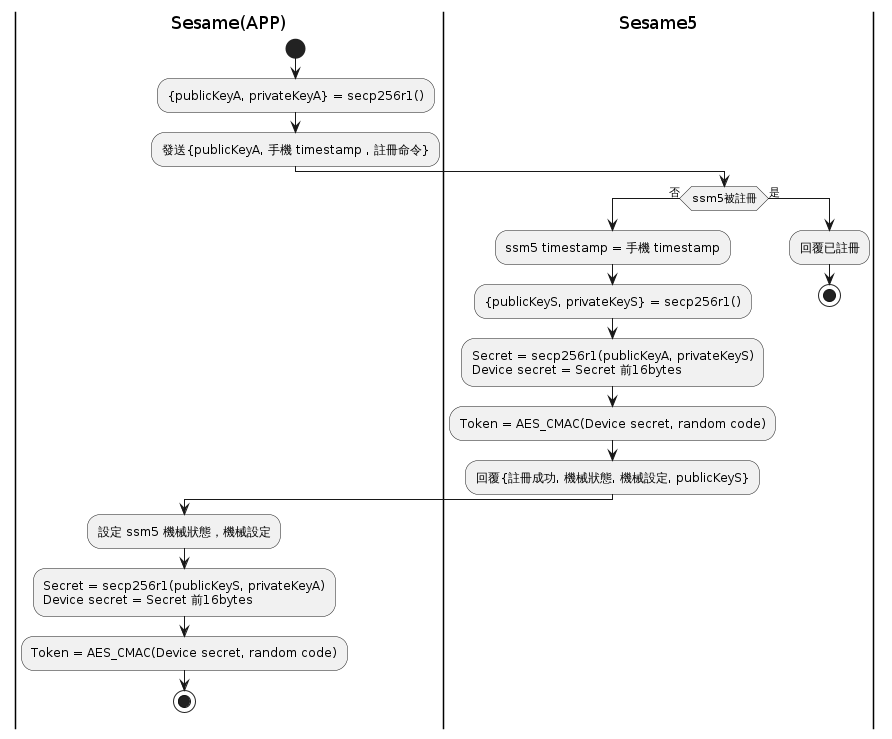
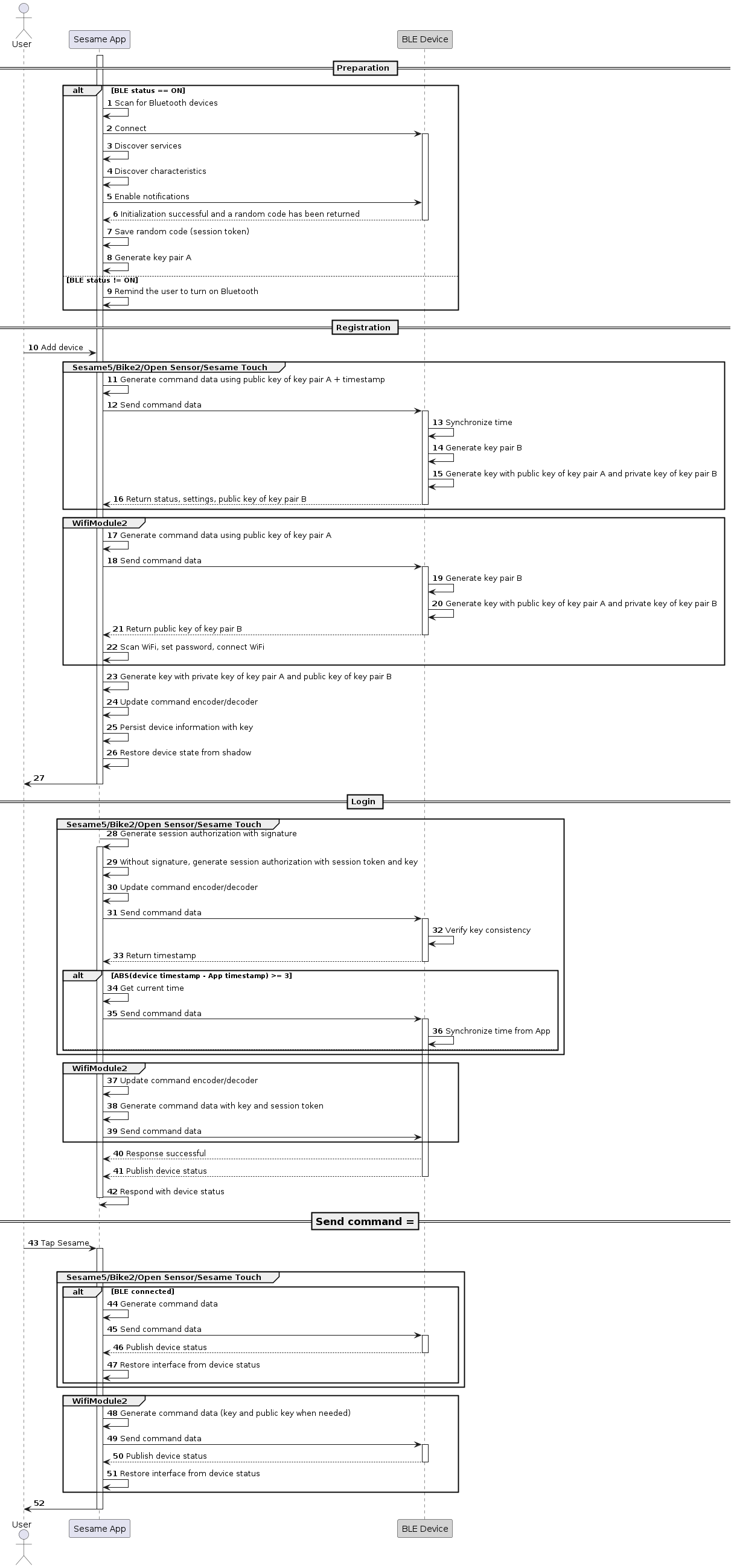
1. Sesame "Register" Activity Diagram
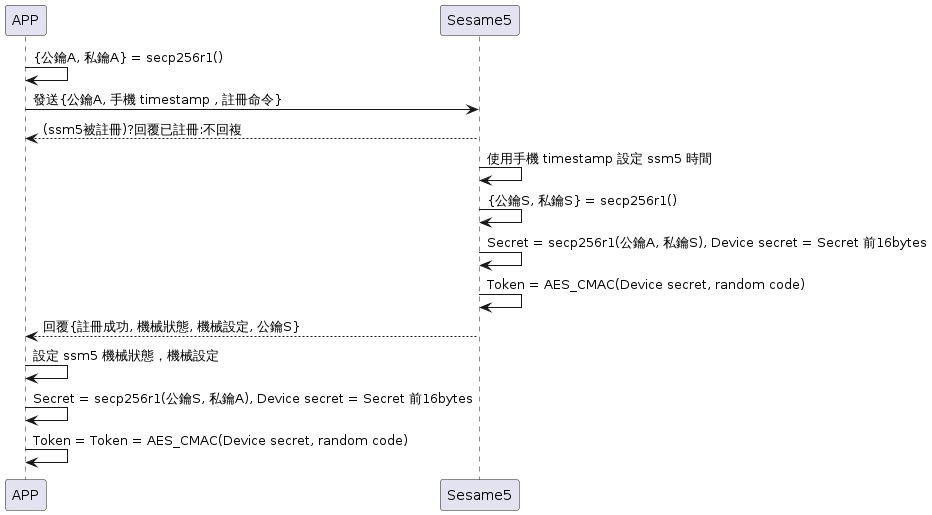
2. Sesame "Register" Sequence Diagram
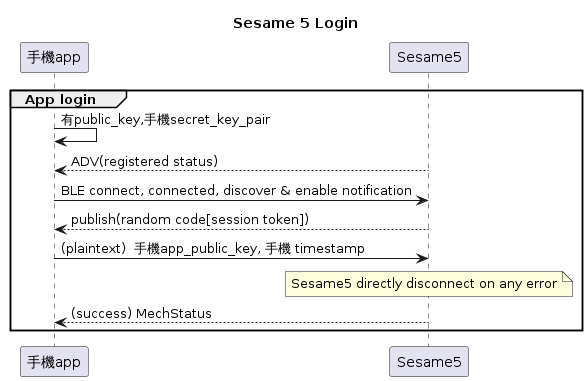
3. Sesame "Login" Sequence Diagram
4. Sesame "Send Command" Sequence Diagram
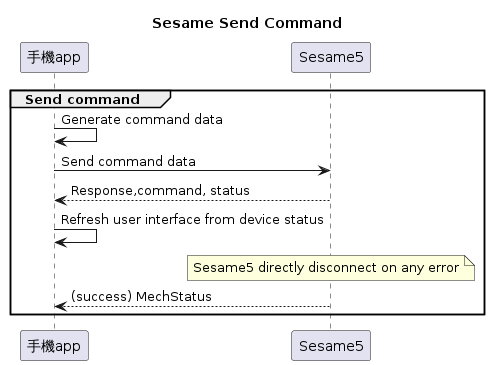
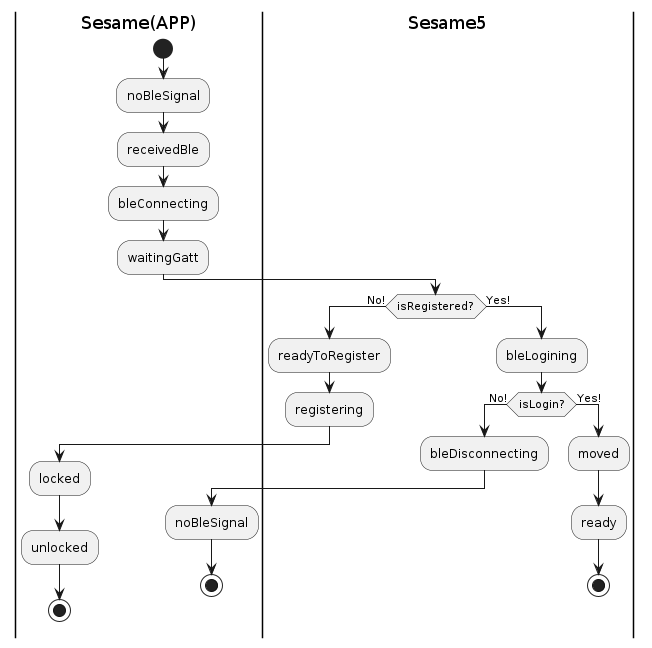
5. State Machine of Mobile Sesame SDK Encapsulation
6. Sesame Timing Chart
Two ways of communication between mobile phone's Bluetooth and Sesame
- The first is Publish, Sesame actively sends messages to the phone.
- The second is Request, the phone asks Sesame to work, and Sesame replies to Response
1. Publish【Sesame->Phone】
When NotifyEnable = True is enabled, Sesame actively pushes subscription messages to the phone, such as the 81_Mechanical Status in the [「Response Command Comparison Table」](#Response Command Comparison Table).
| Byte Index | 0 | 1 | 2 ~ N |
|---|---|---|---|
| Data | type | cmd_code | payload |
| Description | Push Type | Command Number | Data sent to the phone |
typedef struct {
    uint8_t type;               /// Push type: publish
    uint8_t item_code;          /// Command item_code
    union ss5_payload payload;  /// Data sent to the mobile phone
} ss5_publish;
2. Request【Phone->Sesame】
Requestis when the phone asks Sesame to do something, Sesame responds to the receiving status, such as the82_Lockin the [「request command comparison table」](#Request command comparison table)- To avoid confusion, a queue is needed to ensure order, support synchronous serial transmission, and BLE, when acting as a lower computer, reads and writes one feature value
Characteristicseach. The reading and writing operation method is the content of the send protocol
| Byte index | 0 | 1 ~ N |
|---|---|---|
| Data | item_code | payload |
| Description | Command number | Data sent to Sesame |
typedef struct {
    uint8_t item_code;              /// Command (see details in item_code)
    union ss5_payload payload;      /// Data sent to Sesame5
} ss5_request;typedef enum {
ITEM_CODE_NONE = 0,
ITEM_CODE_REGISTRATION = 1,
ITEM_CODE_LOGIN = 2,
...
} item_code_e;2.1. Response command data format
| Byte index | 0 | 1 | 2 | 3 ~ N |
|---|---|---|---|---|
| Data | type | item_code | res | payload |
| Description | Push type | Command number | Command processing status | Data sent to mobile phone |
typedef struct {
    uint8_t type;                   /// Push type: Response
    uint8_t item_code;              /// Command (item_code)
    uint8_t res;                    /// Command processing status (always reply with success)
    union ss5_payload payload;      /// Data sent to the mobile phone
} ss5_response;
Processing Status
typedef enum {
    CMD_RESULT_SUCCESS = 0,         /// Sesame5 will respond success directly upon receiving a command from the phone
    CMD_RESULT_INVALID_ACTION = 9,  /// Registering command when already registered
} cmd_result_e;
2.2 Push Type
When the tag is 0x07, it is a normal response response, 0x08 is a push publish
typedef enum {
    OP_CODE_RESPONSE = 0x07,
    OP_CODE_PUBLISH = 0x08,
} op_code_e;
Request command comparison table
| Byte index | 0 | 1 ~ N | N+ |
|---|---|---|---|
| Data | item_code | payload | others |
| 說明 | 指令編號 | 送給 Sesame 的資料 | 其它資料 |
| 注册 | 1 | 1-64【publicKeyA】 | 65-68【timestamp】 |
| 登入 | 2 | 1-4【ccmkeyA】 | |
| 历史 | 4 | 1【is peek】 | ispeek=true 不删除 |
| 版本 | 5 | none | |
| 更新时间 | 8 | 1-4【timestamp】 | |
| 自动上锁 | 11 | 1-2【秒数】 | |
| 角度校正 | 17 | none | |
| 機械設定 | 80 | 1-5【autolock+开关锁角度】 | |
| 機械狀態 | 81 | none | No Response |
| 關鎖 | 82 | 1-7【历史标签】 | |
| 開鎖 | 83 | 1-7【历史标签】 | |
| 開門 | 90 | none | |
| 關門 | 91 | none | |
| 自動上鎖 | 92 | none | |
| 重置 | 104 | none | |
| 添加芝麻「touch」 | 101 | 1-16【Device Name】 | 17-32【secretKey】 |
| 删除芝麻「touch」 | 103 | 1-16【Device Name】 | |
| 更新卡片「touch」 | 107 | 0【Card ID Len】1-id_len【CardID】 | CardIDLen+1【CardNameLen】etc |
| 删除卡片「touch」 | 108 | 1-16【Card ID】 | |
| 获取卡片「touch」 | 113 | none | |
| 卡片模式 | 114 | none | |
| 指纹更新 | 115 | 0【FingerIDLen】 | 1-Len【FingerID】】 |
| 指纹删除 | 116 | 1【FingerID】 | |
| 指纹获取 | 117 | none | |
| 指纹模式 | 121 | none | |
| 指纹模式设置 | 122 | none | |
| 密码更新 | 123 | 0【PwIDlen】 | 1-pwLen【Password】】 |
| 密码删除 | 124 | none | |
| 密码获取 | 125 | none | |
| 获取密码模式 | 129 | none | |
| 密码模式设置 | 130 | 0 验证 1 新增 |
Response command comparison table
| Byte index | 0 | 1 | 2 | 3 ~ N | N+ | N++ |
|---|---|---|---|---|---|---|
| Data | type | item_code | res | payload | payload | payload |
| 說明 | 推送類型 | 指令編號 | 命令處裡狀態 | 送給手機的資料 1 | 送給手機的資料 2 | 送給手機的資料 3 |
| 初始化 | 8 | 14 | 0 | 0-3【random code】 | none | |
| 注册 | 7 | 1 | 0 | 0-6【mechStatus】 | 7-12【mechSetting】】 | 13~76【publicKeyS】】 |
| 登入 | 7 | 2 | 0 | 0-3【timestamp】 | ||
| 历史 | 7 | 4 | 0 | 0-3【id】】 | 4【type】 | 5-8【timestamp】 |
| 版本 | 7 | 5 | 0 | 0-11【version】 | ||
| 機械設定 | 8 | 80 | 0 | 0-1【lock】 | 2-3【unlock】】 | 4-5【autolock_second】 |
| 機械狀態 | 8 | 81 | 0 | 0-3【random code】 | ||
| 推送芝麻钥匙 | 8 | 102 | 0 | 0-21【ssm0-name】 | 22【ssm0-status】 | 23-44【ssm1_name】etc |
| 获取芝麻钥匙 | 7 | 109 | 0 | 0-3【CardID】 | ||
| 获取指纹 | 7 | 117 | 0 | 0-3【FingerID】 | ||
| 指纹模式获取 | 8 | 121 | 0 | 0-3【random code】 |
| Byte index | 0 | 1 ~ N | N+ |
|---|---|---|---|
| Data | item_code | payload | other data |
| Description | Command number | Data sent to Sesame | Other data |
| Register | 1 | 1-64【publicKeyA】 | 65-68【timestamp】 |
| ... |
| Byte index | 0 | 1 | 2 | 3 ~ N | N+ | N++ |
|---|---|---|---|---|---|---|
| Data | type | item_code | res | payload | payload | payload |
| Description | Push type | Command number | Command processing status | Data 1 sent to the phone | Data 2 sent to the phone | Data 3 sent to the phone |
| Initialization | 8 | 14 | 0 | 0-3【random code】 | none | |
| ... |
Security Layer
The Security Layer is the encryption transmission protocol implemented by the data transparent transmission between the mobile phone Bluetooth and Sesame5.
1. 4-byte Random code
After the mobile phone Bluetooth searches for the Sesame device and connects to open the notify with a feature value of 0xFD81, the Sesame device actively publish sends a 4-byte Random Code/Session Token.(see 14_Initialization)
2. Device Secret
During registration, both the APP and Sesame5 will generate a public key and private key through secp256r1 and exchange to generate a Device secret.
publicKey: 64 BytesprivateKey: 32 Bytes- secret : 32 Bytes
Steps :
- sesame5 uses
secp256r1to generatepublicKeySandprivateKeyS
- sesame5 uses
- APP uses
secp256r1to generatepublicKeyAandprivateKeyA
- APP uses
- Both parties exchange
publicKey
- Both parties exchange
- sesame5 uses
privateKeySandpublicKeyAto generatesecret S
- sesame5 uses
- APP uses
privateKeyAandpublicKeySto generatesecret A
- APP uses
secret Sandsecret Aare equal
- Both parties use the first 16 bytes of the secret as
Device secret.
- Both parties use the first 16 bytes of the secret as
Token Use
- Log in authentication (see :
2_Login)
- Log in authentication (see :
- During data transmission,
aes_ccmis used to encrypt data, using Token as the key used during encryption.
- During data transmission,
Generation Method
Using the AES_CMAC algorithm, the 4Bytes Random code is signed with the Device secret to generate the Token. device_secret: 16 Bytes random_code: 4 Bytes Token: 16 Bytes
AES_CMAC(key:device_secret, input:random_code, input_size:4, output:Token);3. Data Encryption and Decryption
Encryption Parameter: Initialization Vector (CCM_IV)
- count : 8 bytes, initialized to 0 at startup, count increases by one for each encryption
- nouse : 1 byte, default value is 0
- random_code : 4 bytes, updated
random_codeafter connecting to the device
- random_code : 4 bytes, updated
typedef struct {
    int64_t count;///8 byte
    uint8_t nouse;///1 byte = 0
    uint8_t random_code[4];///4 byte
} CCM_IV;
aes_ccm parameters
Input:
- key : Encryption key, used for AES-CCM operation
- iv : Initialization vector (CCM_IV)
- iv length : AES-CCM uses a 13-byte (104-bit) IV
- add : Additional authentication data
- add length : length of additional authentication data
- input : The input data to be encrypted
- input length : Length of data to be encrypted
- tag length : Length of buffer and tag used to store authentication tag (MAC)
Output:
- tag : ccm_tag
- output : ccm_ecrrypt_data, data after encryption
C language Encryption Example
aes_ccm_encrypt_and_tag(
                        key:ccm_key,
                        iv:CCM_IV,
                        iv_length:13,
                        add:0x00,
                        add_length:1,
                        input:p_data,
                        add_length:length,
                        output:ccm_ecrrypt_data,
                        tag:ccm_tag,
                        tag_length:4
                        );
CCM_IV.count ++;
AES is a symmetric encryption algorithm, the method name is aes_ccm_auth_decrypt, and the parameters correspond to encryption
C language Decryption Example
aes_ccm_auth_decrypt(
                    key:ccm_key,
                    iv:CCM_IV,
                    iv_length:13,
                    add:0x00,
                    add_length:1,
                    input:ccm_ecrrypt_data,
                    add_length:length,
                    output:ans_data,
                    tag:ccm_tag, tag_length:4
                    );
CCM_IV.count ++;
Note
The count in the CCM_IV used for data encryption and decryption records the number of encryption times. If the counts at the encryption and decryption ends do not match, it will cause decryption failure.
Segment Layer
The Segment Layer has two tasks.
- When Sesame5 communicates with the mobile phone, the maximum packet size is limited to 20Bytes. If you want to send long messages, you need to split the data and reassemble it at the receiving end.
- Mark whether the transmitted data is encrypted, and there are three types of plaintext ciphertext packet methods with different lengths.
1. Mark Reference Table
Segment Layer marks whether this packet has been cut or encrypted in the packet header. The receiving end can handle it according to the mark and restore the packet to the original data. The following is a Segment Layer mark reference table.
Segment Layer mark has 8bits, of which bit 7 ~ 1 indicates whether it is the end packet and whether the data is encrypted, and bit 0 indicates whether this packet is the starting packet of a data.
| bit 7 ~ 1 | end | bit | start |
|---|---|---|---|
| b0000000 | no end | 0 | not start |
| b0000000 | no end | 1 | start |
| b0000001 | plaintext end | 0 | not start |
| b0000001 | plaintext end | 1 | start |
| b0000010 | encryption end | 0 | not start |
| b0000010 | encryption end | 1 | start |
Mark in hexadecimal
0 This packet is neither a start packet nor an end packet
1 This packet is a start packet but not an end packet
2 This packet is not a start packet but an end packet, and the assembled data is plaintext
3 This packet is both a start and end packet, and the data is plaintext. The data is not cut and does not need to be recombined
4 This packet is not a start packet but an end packet, and the assembled data is ciphertext
5 This packet is both a start and end packet, and the data is ciphertext. The data is not cut and does not need to be recombined
| Mark | start | end |
|---|---|---|
| 0x00 | not start | no end |
| 0x01 | start | no end |
| 0x02 | not start | plaintext end |
| 0x03 | start | plaintext end |
| 0x04 | not start | encryption end |
| 0x05 | start | encryption end |
Example
Assuming a packet can hold 4bytes of data, it needs to be split if it exceeds 4bytes (actually 20bytes).
2. Three kinds of plaintext ciphertext packet methods with different lengths
2.1 Short plaintext packet
Data: A A B B
Sent:
1. Received data: A A B B
2. Data: A A B B
3. Add packet header: 3 A A B B
Received:
4. Received: 3 A A B B
5. Remove the packet header to restore data: A A B B
2.2 Medium plaintext packet
Data: A A A A B B B B
Sent:
1. Received data: A A A A B B B B
2. Split data: A A A A
3. Add packet header: 1 A A A A
6. Split data: B B B B
7. Add packet header: 2 B B B B
Received:
4. Received: 1 A A A A
5. Determine that the data has not been sent completely, waiting for the next packet
8. Received: 2 B B B B
9. Data reception is complete, assemble packets
10. Remove packet header to restore data: A A A A B B B B
2.3 Long plaintext packet
Data: A A A A B B B B C C C C
Sent:
1. Received data: A A A A B B B B C C C C
2. Split data: A A A A
3. Add packet header: 1 A A A A
6. Split data: B B B B
7. Add packet header: 0 B B B B
10. Split data: C C C C
11. Add packet header: 2 C C C C
Received:
4. Received: 1 A A A A
5. Determine that the data has not been sent completely, wait for the next packet
8. Received: 0 B B B B
9. Determine that the data has not been sent completely, wait for the next packet
12. Received: 2 C C C C
13. Data reception is complete, assemble packets
14. Remove packet header to restore data: A A A A B B B B C C C C
2.4 Short ciphertext packet
Data: A A B B
Data after encryption: X X Y Y
Sent:
1. Received data: A A B B
2. Data after encryption: X X Y Y
3. Add packet header: 5 X X Y Y
Received:
4. Received: 5 X X Y Y
5. Remove packet header to restore data: X X Y Y
6. Decryption: A A B B
2.5 Medium ciphertext packet
Data: A A A A B B B B
Data after encryption: X X X X Y Y Y Y
Send:
1. Received data: A A A A B B B B
2. Data after encryption: X X X X Y Y Y Y
3. Split data: X X X X
4. Add packet header: 1 X X X X
7. Split data: Y Y Y Y
8. Add packet header: 4 Y Y Y Y
Received:
5. Received: 1 X X X X
6. Determine that the data has not been sent completely, wait for the next packet
9. Received: 4 Y Y Y Y
10. Data reception is complete, assemble packets
11. Remove packet header to restore data: X X X X Y Y Y Y
12. Decryption: A A A A B B B B
2.6 Long ciphertext packet
Data: A A A A B B B B C C C C
Data after encryption: X X X X Y Y Y Y Z Z Z Z
Sent:
1. Received data: A A A A B B B B C C C C
2. Data after encryption: X X X X Y Y Y Y Z Z Z Z
3. Split data: X X X X
4. Add packet header: 1 X X X X
7. Split data: Y Y Y Y
8. Add packet header: 0 Y Y Y Y
11. Split data: Z Z Z Z
12. Add packet header: 4 Z Z Z Z
Received:
5. Received: 1 X X X X
6. Determine that the data has not been sent completely, wait for the next packet
9. Received: 0 Y Y Y Y
10. Determine that the data has not been sent completely, wait for the next packet
13. Received: 4 Z Z Z Z
14. Data reception is complete, assemble packets
15. Remove packet header to restore data: X X X X Y Y Y Y Z Z Z Z
16. Decryption: A A A A B B B B C C C C
Note
After the data is encrypted with AES_CCM, in addition to the ciphertext, it will also generate a 4Bytes ccm_tag for decryption. The ciphertext and ccm_tag need to be transmitted to the receiving end together, so the data will increase by 4Bytes after encryption. See security_Layer description for details.